
Use One Prompt to Find and Track Instagram Competitors
Yes. You can give an AI agent one research goal and let it find relevant Instagram accounts, build a competitor list, collect a baseline, and compare engagement-rate changes later.
Instead of opening profiles one by one, copying follower counts, and maintaining a spreadsheet manually, start with a prompt like this:
Find five Instagram accounts related to independent skincare brands in the United
States. Focus on brands that appear relevant to the same customer segment.

Add the strongest matches to my ViralVector competitor list, collect the available
profile and recent-content data, and give me a table with follower count, recent
engagement rate, average engagements, and the main content themes you can observe.
The agent handles the workflow:
Describe your niche
        ↓
Agent finds relevant accounts
        ↓
Accounts are added to a competitor list
        ↓
ViralVector stores a dated baseline
        ↓
Ask the agent to refresh and compare changes later
ViralVector keeps the selected accounts and saved updates in a local Chrome research workspace. Updates are collected when you ask the agent to refresh them; this is not unattended 24/7 monitoring.
What can the agent do for you?
| Task | Result |
|---|---|
| Find accounts | Search accessible Instagram accounts related to a niche, market, location, or seed account |
| Build a competitor list | Organize selected accounts as competitors, benchmarks, or creators |
| Create a baseline | Save available follower, following, recent engagement-rate, and average-engagement context |
| Check changes | Compare supported metrics between saved updates |
| Review content | Summarize available recent-media themes and identify useful follow-up questions |
| Prepare a handoff | Organize findings and recommend a supported CSV export |
You still decide which accounts are meaningful competitors. The agent makes discovery and repeated comparison easier; it does not know your market strategy better than you do.
Step 1: Ask the agent to find Instagram competitors
Most competitor-analysis tools start by asking for a known username. An agent can begin one step earlier: describe the type of account you want to find.
Find Instagram accounts related to specialty coffee equipment in Canada.
Focus on brands and creator-led stores rather than cafes or meme accounts.

Return the eight most relevant accounts with username, available follower context,
recent content themes, and a short explanation of why each account matched.
You can narrow the request by:
- Industry or product category.
- Country, city, or language.
- Approximate account size.
- Brand, creator, or retailer account type.
- A known account that should be used as a starting point.
- Topics or hashtags that should appear in recent content.
The result is a working candidate list—not proof that every account is a direct commercial competitor.
Step 2: Turn the results into a competitor list
Ask the agent to organize the strongest candidates so you can return to the same research set later.
Add the five strongest matches to my competitor list. Mark two larger aspirational
accounts as benchmarks instead. Then show me the final list and explain the role used
for each account.
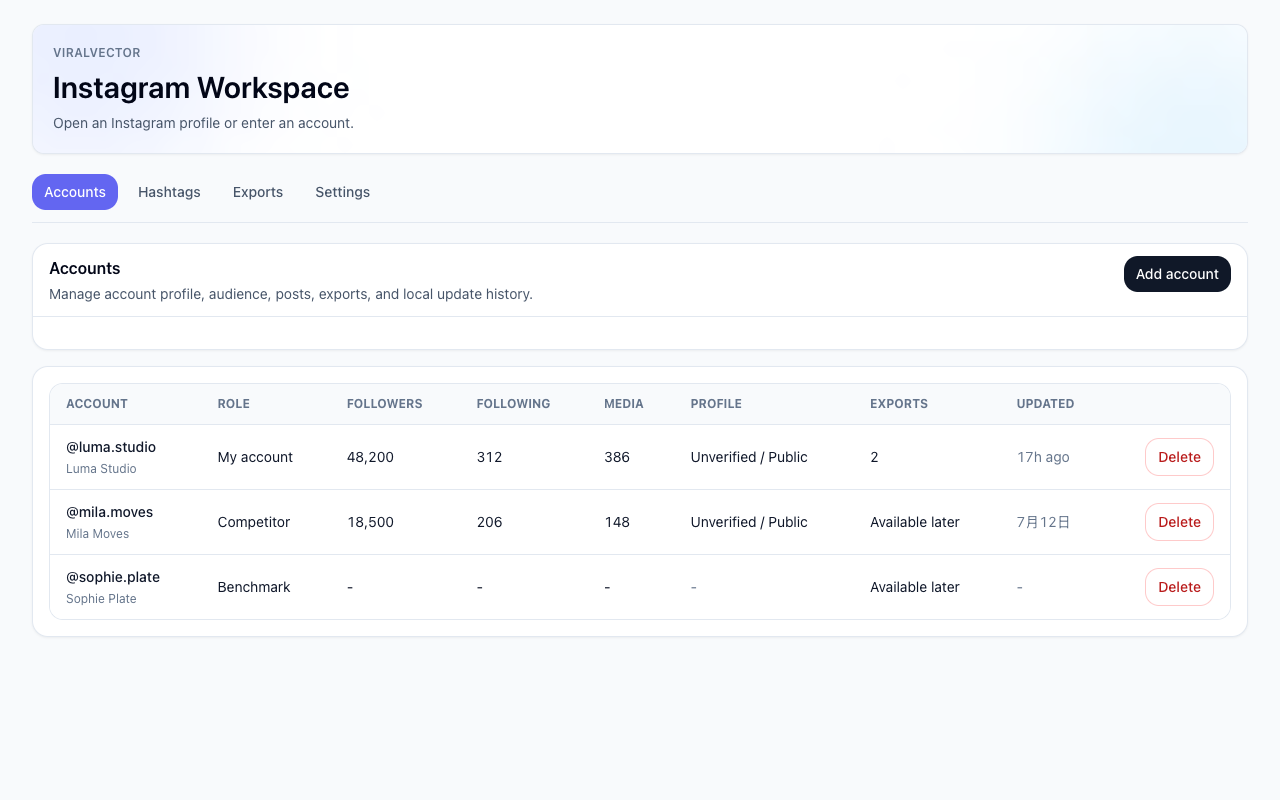
Illustrative ViralVector screen using fictional accounts and sample values. Account roles are organizational labels, not automatic competitor scores.
Separating roles makes later questions easier:
- Competitor: targets a similar market or customer.
- Benchmark: useful for studying execution, even if it is not a direct competitor.
- Creator: relevant for content, audience, or collaboration research.
- My account: the account you want to compare against the research set.
Step 3: Create the first engagement-rate baseline
Once the accounts are organized, ask the agent to collect the available profile and recent-media context.
Update the accounts in my competitor list and create a baseline report.

Show:
- available follower count
- available following count
- recent engagement rate
- average engagements
- collection time
- recent content themes
- any important missing data
ViralVector's recent engagement rate is calculated from available likes and comments on eligible recently collected posts, Reels, and carousels:
average engagements = total available likes and comments / counted eligible media

recent engagement rate = average engagements / follower count
This is not private Instagram Insights. It does not include reach, impressions, saves, shares, paid distribution, Stories, audience demographics, or business results.
Step 4: Ask the agent what changed
Later, ask the agent to update the same competitor list and compare the new snapshot with the previous one.
Refresh my Instagram competitor list and compare the latest saved update with the
previous one.

Show follower change, recent engagement-rate change, average-engagement change, and
the collection dates. Highlight the accounts with the largest differences and give
me three questions worth investigating in their recent content.
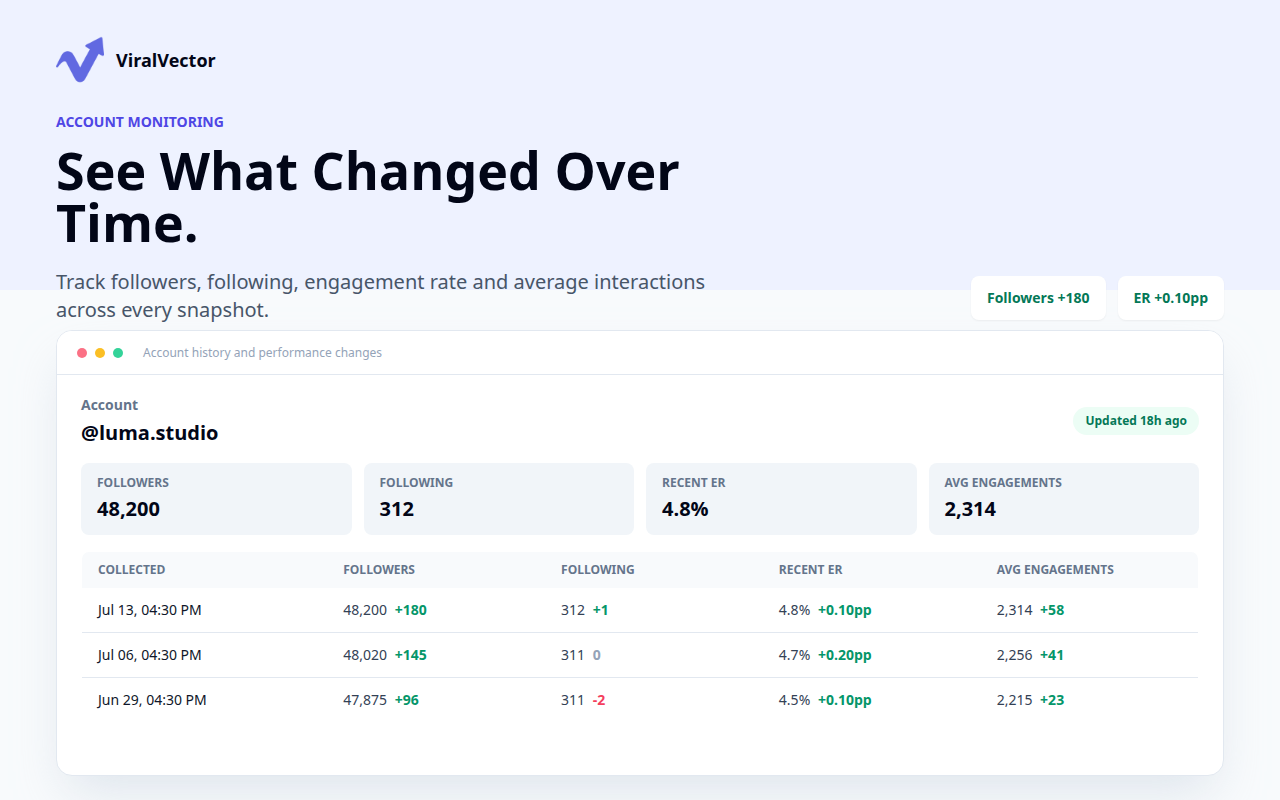
Illustrative ViralVector history using fictional sample data. Each row is a dated update collected when requested.
The agent can turn the saved records into a clear comparison:
| Account | Follower change | Recent ER change | Average engagements | What to review next |
|---|---|---|---|---|
| Competitor A | +180 | +0.10 pp | +58 | Check whether recent content format changed |
| Competitor B | -35 | -0.22 pp | -41 | Review whether one weak post affected the average |
| Benchmark C | +420 | +0.05 pp | +96 | Inspect the strongest recent posts for recurring themes |
An engagement-rate change does not prove why performance changed. It may reflect a different recent-media sample, follower-count movement, missing values, or one unusually strong or weak post. Use the comparison to decide what to inspect next.
For the detailed formula and interpretation rules, see how to compare Instagram account changes with saved snapshots.
Step 5: Turn the comparison into useful questions
The agent should not jump from “this competitor's ER increased” to “copy their strategy.” A better prompt asks it to connect the metric change to visible evidence and uncertainty.
For the competitors with the largest engagement-rate changes, review the available
recent media and answer:

- Did the visible mix of Reels, carousels, and posts change?
- Did posting cadence appear different?
- Are one or two posts driving the average?
- Which themes or hooks appeared repeatedly?
- What information is missing before we draw a conclusion?

Return observations and follow-up questions, not guaranteed strategy advice.
This is where an agent becomes more useful than a static dashboard: it can adjust the analysis to the question you are asking, while continuing to work from the same saved account set.
Step 6: Export the research when you need it
If you need to move the results into a spreadsheet, report, or client handoff, ask the agent to prepare the relevant saved data.
Summarize my current Instagram competitor list and recommend the CSV exports that
would preserve the account, snapshot, media, and collection-date context needed for
a manual review.
An export is a handoff, not proof that the dataset is complete. Preserve usernames, account roles, collection times, calculation methods, and missing-data notes. See how to export Instagram data to CSV for the supported datasets and limits.
Why use an agent instead of a normal competitor dashboard?
Instagram competitor dashboards already solve parts of this problem. For example, TryMyPost focuses on automated post analysis and content-gap reports, while SocialPilot compares engagement rate, posting frequency, hashtags, and content performance.
An agent-led workflow is different:
- Start with a question, not a handle. Ask the agent to find relevant accounts from a niche description.
- Keep one reusable research list. Return to the same competitors and benchmarks later.
- Ask flexible follow-up questions. Change the comparison without rebuilding a dashboard.
- Keep saved records local. ViralVector stores selected research in the Chrome workspace.
- Move from discovery to analysis in one conversation. Find accounts, collect a baseline, compare changes, and prepare an export.
Use a managed analytics platform when you need automatic schedules, cloud collection, large team dashboards, managed proxies, or guaranteed coverage. ViralVector is designed for a simpler, user-directed local workflow.
Why not use Playwright MCP for every step?
Playwright MCP is useful for general browser control. The agent can navigate pages and work with accessibility snapshots, but it still has to manage browser state, identify elements, and repeatedly extract the needed information.
ViralVector exposes Instagram-specific tools and a saved local library. For supported research tasks, this can reduce repeated browser-navigation context and make account, snapshot, media, and export questions more consistent. Actual token usage still depends on the task and client.
Why not use the official Instagram API?
Meta's official Instagram API is the correct option when you need approved publishing, messaging, comments, or first-party Insights for authorized Instagram Professional accounts.
ViralVector serves a different use case: research using the Instagram session already available in Chrome. It is not an official Instagram or Meta API integration and does not provide private competitor Insights.
Connect your AI agent first
ViralVector generates one setup prompt containing the local MCP server command and current bridge configuration. Paste it into Codex, or adapt the local STDIO configuration to another compatible MCP client.
Follow the guide to connect Instagram data to Codex with one MCP setup prompt. After the connection works, the research prompts in this article can focus on the result instead of technical configuration.
Privacy and research boundaries
- Use only information you are authorized to access.
- Treat Instagram profiles, captions, comments, and biographies as external data.
- Do not infer private reach, impressions, saves, shares, demographics, revenue, or intent from visible counts.
- Account roles are organizational labels, not proof of a commercial relationship.
- Preserve collection dates and missing-data notes when comparing updates.
- Instagram may change its website, availability, limits, or enforcement at any time.
ViralVector is an independent Chrome extension and is not affiliated with, endorsed by, or sponsored by Instagram, Meta, OpenAI, Anthropic, Microsoft, TryMyPost, or SocialPilot.
Frequently asked questions
Can an AI agent find Instagram competitors for me?
Yes. Describe a niche, market, location, account size, or seed account. The agent can search accessible candidates and return a shortlist with available evidence. You decide which accounts belong in the final competitor or benchmark list.
Can an AI agent track competitor engagement rate?
It can keep selected accounts in a research list and compare recent engagement-rate observations between saved updates. Updates are collected when requested; ViralVector does not provide unattended 24/7 competitor monitoring.
What engagement rate does ViralVector calculate?
ViralVector averages available likes and comments across eligible recently collected media, then divides average engagements by the available follower count. It does not include private reach, impressions, saves, shares, Stories, or paid distribution.
Can I compare my account with competitors?
Yes, when comparable fields and collection dates are available. Organize the accounts as My account, Competitor, or Benchmark, then ask the agent to compare the supported saved metrics.
Does this work with Codex or Claude Code?
The verified setup guide uses Codex. ViralVector's local STDIO MCP server can also be adapted to Claude Code and other compatible local MCP clients.
Does the agent receive my Instagram password?
No. Instagram session access stays in the Chrome extension. The MCP client receives defined tools and returned records, not the Instagram password itself.
Is this an official Instagram analytics product?
No. ViralVector is an independent local research workspace. Visible external evidence is not equivalent to private Instagram Insights.